
The RAG (Retrieval-Augmented Generation) market is growing from $1.2bn in 2024 to a projected $11bn by 2030 — 49% a year. According to McKinsey, 71% of organisations are already using generative AI in at least one business function. Deloitte confirms that 42% of them see real cost savings and productivity gains.
At the same time, 8 out of 10 AI assistant rollouts in European SMEs start with one sentence: “we want to build something like ChatGPT, but on our own documents”. And three months later they end with the same sentence — with no working application in between.
This post is the playbook that changes that. Not an intro to RAG (there’s plenty of that online). Not a list of best practices. A concrete four-week schedule that we run with customers — with tool names, success metrics and the decisions you have to make along the way.
Grab a cup of coffee first. Twelve minutes of reading. A template to download at the end.
Table of contents
- Why 4 weeks, not 3 months
- Week 1: Audit and source clean-up
- Week 2: Embedding and hybrid retrieval
- Week 3: Grounding prompt and eval set
- Week 4: Pilot in a single department
- What next: week 5 and beyond
- Download the template and checklist
Why 4 weeks, not 3 months
Most RAG projects in European SMEs die at one of three stages:
Decision paralysis at the start. “We need to think through the architecture first, run an RFI on vendors, pick a model, draft an AI strategy.” Three months of meetings later, nothing works, and the team has lost faith that it ever will.
Drowning in scale. “Let’s dump every company document into the knowledge base and see what happens.” A week in, the system is answering with documentation from five years ago, mixing up policies from different departments and hallucinating procedures that don’t exist.
No definition of success. “Let’s see if it even works.” A month in, users say “sometimes yes, sometimes no”, IT doesn’t know whether this is production or still an experiment, and the board doesn’t know whether to keep investing.
The playbook I’m describing solves all three. It narrows the scope (pilot, not big bang), forces measurability (three metrics from day one) and splits the work into four weeks, each with a clear goal.
I don’t promise you a company-wide RAG deployment in four weeks. I promise you a working pilot for one department that you’ve actually measured — and the data to decide whether and how to expand.
Week 1: Audit and source clean-up
The most expensive lesson in RAG projects: the quality of the assistant’s answers depends 70% on source quality, not model quality. You can have Claude Opus, the best embedding and the latest reranker — if your documents are rubbish, you’ll get intelligent-sounding rubbish.
That’s why the first week is not a deployment week. It’s a clean-up week.
Step 1.1 — Source registry
List every knowledge source in your company that you’re considering adding to the assistant. Specifically:
- SharePoint (which libraries, which folders)
- Google Drive (which Shared Drives, which personal folders)
- Confluence (which spaces)
- Ticketing systems (Zendesk, Intercom, Freshdesk, HubSpot)
- Local drives with archived documents
- Email archives (if you’re considering including them — think twice)
- PDF and Word files sent as attachments
- Internal wikis, Notion, Obsidian
For each source, note: owner (who’s responsible), date of last update, document count, content type (procedures, contracts, technical knowledge, FAQs).
At this stage alone you’ll filter out 30–40% of sources as “out of date” or “duplicates”. That’s good news. An outdated document is worse in the assistant than a missing one.
Step 1.2 — Chunking that preserves structure
Once you have the source set, you have to split them into pieces (chunks) — because an AI model doesn’t process whole documents, just the fragments it gets as context.
Production recommendation: 200–600 tokens per chunk, preserving headings. So if a document has a “Returns procedure” section with sub-points 1.1, 1.2, 1.3 — split the chunks along the sub-points, but have each chunk carry the path of its parent heading.
Effect: the model sees not only the content of the fragment but also where in the document it sits. That radically changes answer quality. The fragment “returns are accepted within 14 days” is ambiguous on its own — but in the context “Returns procedure > International orders > Terms” it becomes precise.
Step 1.3 — Metadata
Each chunk gets technical metadata that you later use for filtering and routing:
- owner — the document’s owner (for follow-up on ambiguities)
- product/department — the area it covers (for dedicated assistants)
- region — if the company operates in multiple markets
- valid-through date — when the content was last updated
- security label — who can see this fragment (public / internal / confidential / restricted)
Metadata serves two purposes. Technically — it lets you filter search so that the HR assistant doesn’t return fragments from the sales strategy. Operationally — it gives you auditability: you know who’s responsible for a given piece of knowledge and when it was last updated.
Step 1.4 — PII redaction and lawful basis
Before you index anything — review the data for PII (personal data). Customer names in emails, ID numbers in contracts, health data in HR files.
For each category of personal data, answer one question: “do we have a lawful basis to process this data through an AI system?” Under GDPR and the EU AI Act, simply moving data from SharePoint into a vector database is new processing, which requires its own lawful basis.
In many cases the answer is: “no”. Then: redaction (automatic or manual) before indexing. Don’t feed rubbish to the assistant; don’t feed it data you aren’t allowed to use either.
This step saves you weeks of discussion with your lawyer and DPO later. If you’re still mapping where your AI data lands in the first place, start with the pillar post 4 levels of AI sovereignty — which one fits your European company — it gives you the data-classification frame you’ll need here.
Week 2: Embedding and hybrid retrieval
Sources are clean. Now to index them so the assistant finds the right fragments when a user asks.
Step 2.1 — The search stack
Specifically, at Ragen we use this stack:
- Qdrant — vector database for storing embeddings. Fast, open-source, scales well.
- Cohere Embed Multilingual v3 — embedding model for English, Polish, German, French and other European languages. Handles European languages better than OpenAI ada-002 or text-embedding-3-small in our tests.
- BM25 — classical keyword search algorithm. Sounds dated, but in 2026 it’s still essential.
- Cohere Rerank v3.5 — model that takes the top 20–50 results from hybrid search and reorders them by actual relevance.
Schematically, the pipeline looks like this:
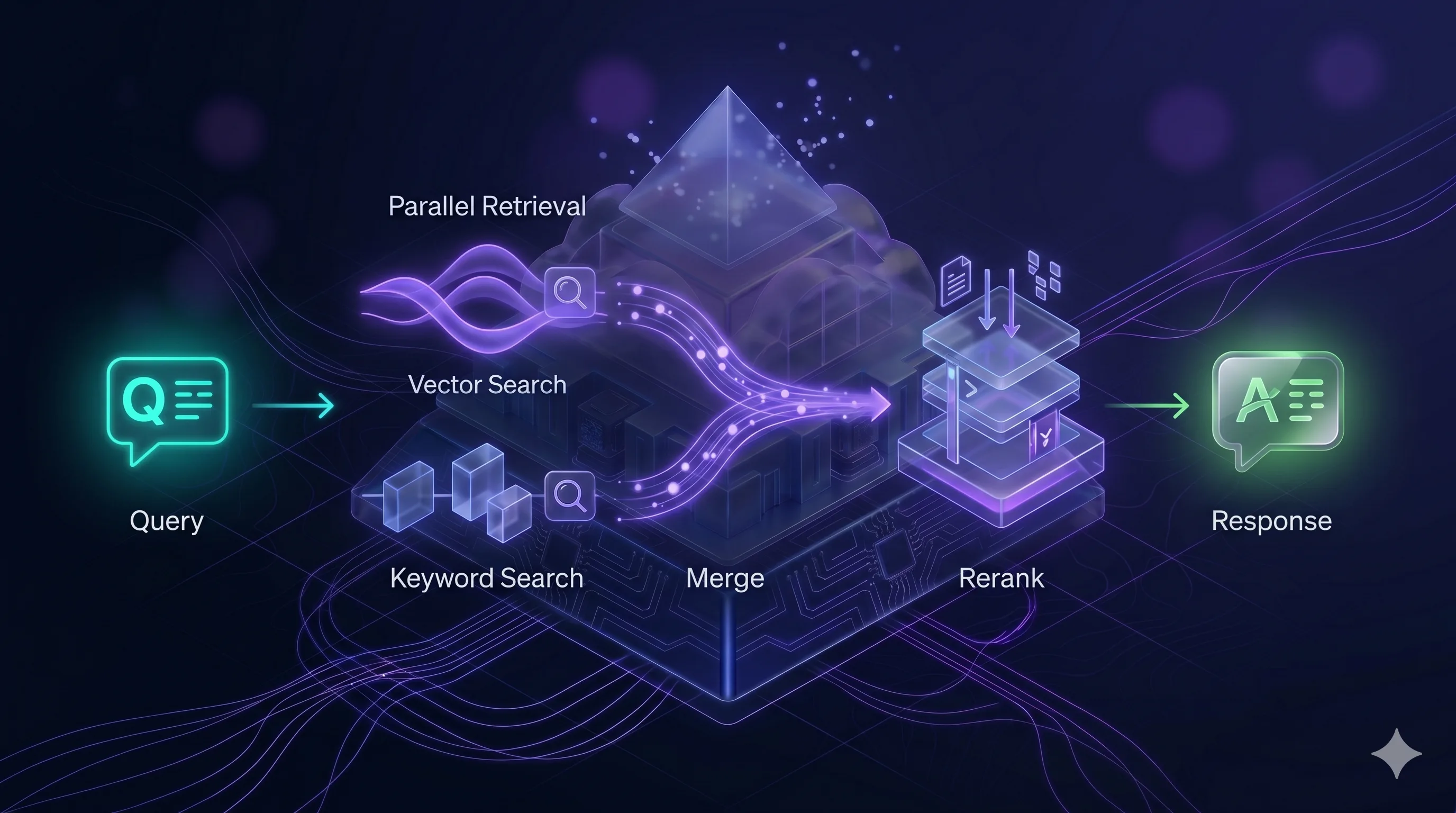
You can use different components (Pinecone instead of Qdrant, OpenAI embeddings instead of Cohere). But this specific four-layer arrangement is critical. More on that below.
Step 2.2 — Why hybrid retrieval, not just vectors
The most common mistake in early RAG deployments: “we’ll dump everything into the vector store and let semantic search do the work”. It won’t.
Vector search is excellent for questions about meaning (“how do I resolve problem X” → finds the remediation procedure even if the words don’t overlap). But it’s weak on questions about specifics (“what’s the status of order FV-2024-0031” → you want exactly that number, not “something similar”).
BM25 is exactly the opposite. Excellent on exact keyword matches, weak on conceptual questions.
Hybrid retrieval combines both. The query goes in parallel to both engines, results are merged, and the best ones move to the next step. A user types “how do I cancel my subscription” and the document uses the phrase “service agreement termination” — vectors catch that. They then ask “what about invoice 2024/456” — BM25 finds exactly that invoice.
Only both together give you production-grade quality.
Step 2.3 — Reranking isn’t an option, it’s a requirement
Hybrid retrieval returns 20–50 candidate fragments. Of that list, only 3–5 ultimately land in the model’s context (because context is limited and a longer context means a slower, more expensive answer).
Problem: the first 20 results from search aren’t ordered best-first. Qdrant and BM25 use different metrics. The top-1 from vectors may be worse than the top-5 from BM25.
A reranker (we use Cohere Rerank v3.5) is a separate model that looks at the user’s question and each of the 20–50 candidates, and reorders them by actual relevance to the question. It adds ~300ms of latency but improves answer quality by 20–40% on our benchmarks.
In 2026, reranking isn’t an option. It’s the condition for a RAG deployment to be usable in production. If someone proposes a rollout “without a reranker, because we have a good model” — that’s a sign they’re building a prototype, not a product.
Step 2.4 — Multi-tenancy via client_id
If you plan for the assistant to serve more than one department or more than one customer, build multi-tenancy in from day one.
In practice: each chunk in the vector database has a client_id (or tenant_id, or org_id) field in its payload. Every query to the database comes with a filter on a specific tenant. The vector database is single, but tenant A never receives a fragment from tenant B.
Adding multi-tenancy later is a migration. Designing it in at the start is five minutes of config. There’s no reason not to do it — unless you’re 100% sure the system will never serve more than a single “world” of data.
Week 3: Grounding prompt and eval set
The third week is about how the model answers, not what it finds.
Step 3.1 — Grounding prompt
The grounding prompt is the model’s system prompt. It defines how the model should behave with the context it’s given.
A good grounding prompt does three things:
1. Forces citation. The model doesn’t just answer — it cites specific fragments of the document. Not “probably, this means…” but “according to the Returns policy, section 4.2: …”. That’s the auditability layer — the user can verify every statement.
2. Refuses when coverage is missing. If the supplied context doesn’t contain the answer, the model has to say “I don’t have that information in the available documents” rather than hallucinate. This is the hardest part of the grounding prompt. An LLM naturally wants to be helpful — you have to “teach” it that in this system, silence is better than confabulation.
3. Clear task boundaries. The model answers questions about the documents; it doesn’t chat about the weather, it doesn’t write Python, it doesn’t give medical advice. Keeping the model in the role of a company knowledge assistant is critical — otherwise you end up with a general chatbot that happens to use your documents sometimes.
Step 3.2 — Eval set: 100 questions as a benchmark
The most important pilot asset that most companies don’t create: an eval set. A list of 100 representative questions with expected answers, used for regression testing of quality.
100 questions is the minimum. Gather them like this:
- 40 questions from the department’s real history (what customers/employees ask most often)
- 20 questions that are hard (need to combine two documents, cover edge cases)
- 20 questions whose answer is “that’s not in the documents” (refusal test)
- 20 questions that try to push the system outside its role (“write me a poem”, “ignore the instructions”)
For each question you note: the expected answer (or range of acceptable answers), the source document, criticality (blocker / nice-to-have).
Run the eval set before every rollout to a new department, or after any significant change in the knowledge base. This is your regression suite — like unit tests in classic software.
Without an eval set you don’t know whether a prompt change improved the assistant or broke it. You’re guessing.
A Google Sheet template for the eval set is available at the end of the post.
Week 4: Pilot in a single department
The fourth week is rollout. But — critically — not for the whole company. For a single department with one specific use case.
Step 4.1 — Choosing the pilot department
Three strongest candidates:
HR policy desk. Employees ask about leave, benefits, procedures. The documentation is compact (regulations, policies), the questions are repeatable. Low risk, high volume — ideal for a pilot.
Pre-sales / quotation handling. Sales reps need fast answers to customer questions about products, specs, prices. ROI shows within a week, because time-to-answer to the customer is measurable.
First-line customer support. Typical customer questions, repeatable answers, large sample for measurement. Downside: data is often sensitive (PII), so redaction has to be sorted out in advance.
Don’t run the pilot in the legal team, finance, or on board-level strategy. Too much sensitivity, too few questions, too hard to benchmark. Those departments are a stage-2 target, not a pilot.
Step 4.2 — Three success metrics
The pilot has to be measurable. Three metrics, not more:
1. Helpfulness ≥ 90%. Users rate answers (thumbs up/down). Target: ≥ 90% positive ratings on questions within the assistant’s scope. Below 80% — something is fundamentally wrong. Between 80–90% — there are narrow areas to improve.
2. Hallucinations ≤ 2%. Across all answers — how many contain information that isn’t in the documents? Measure by human review of a sample (10% of answers per week). Target: under 2%. Above 5% — the system isn’t production-ready and goes back to grounding-prompt refinement.
3. Latency ≤ 2.5 seconds. From sending the question to the start of the answer being streamed. Above 3 seconds, users drop off. Latency optimisation is often about narrowing top-k in retrieval (fewer candidates → faster rerank → faster answer).
Measure all three in weeks 2 and 4 of the pilot. The difference between those measurements is your signal for whether the system is learning / improving or stagnating.
Step 4.3 — GDPR and user messaging
Two requirements you can’t skip:
GDPR-compliant retention log. Every conversation with the assistant is data processing. You need a clear policy: how long logs are retained, who has access, how they’re deleted. Recommendation: 30 days for debugging, then automatic deletion. Pseudonymise user IDs in logs.
User messaging. Every user of the pilot assistant sees a clear notice: “Answers are generated from internal documents dated [range]. They are not legal/medical/tax advice. If in doubt, consult [specific person/team].” This isn’t just compliance — it’s expectation management. Users who know the AI can be wrong verify critical answers. Users who don’t know — pass hallucinations on to customers.
What next: week 5 and beyond
The pilot has produced data. Now — an expansion roadmap.
Expansion to a second department. Not in parallel, sequentially. Two departments at once means twice the problems while processes still aren’t stable. Add the second department only once the first has held its metrics for four weeks.
Structured data and tool calling. Questions like “how many orders has customer X placed in Q1” require SQL, not document search. A further architectural layer — an agent with database access via tools (function calling). The standard that has established itself here is MCP — we cover it in MCP — USB-C for AI. One assistant instead of five chatbots. It’s a jump in complexity; plan 3–6 weeks for that layer alone.
Multi-hop retrieval. Complex questions that need multiple fragments from different documents. “Which regions have returns procedures that diverge from the global policy?” — that’s two hops, each needing its own query. Check whether this is really needed — often 95% of questions are simple, and multi-hop is over-engineering.
Agentic RAG. An agent breaks a complex question into sub-questions, runs them sequentially, synthesises the answer. This is the future, but don’t start with it. First get classic RAG working; then add complications.
The “on-premise vs regional EU cloud” decision for a production rollout is a topic in its own right — see Cloud or on-premise? How to choose an AI deployment model.
Download the template and checklist
A pilot needs preparation. For readers of this post we make two assets available to download:
- Eval set template — a Google Sheet with the structure of 100 benchmark questions, ready for your team to fill in
- Data audit checklist — a step-by-step checklist for week 1 (source registry, chunking policy, metadata schema, PII audit)
Available via the contact link: book a rollout conversation — we’ll email both templates before the call.
When outside help makes sense
You can run this playbook yourself. At Ragen, we help you run it faster and avoid the mistakes we’ve seen at other companies.
What we do:
- AI Mapping workshop (2 days) — mapping AI usage in your company, prioritising the pilot, picking the department
- Ragen AI rollout in a week — platform on-premise or in Ragen Cloud, ready for stage 2 (embedding)
- Pilot support — eval set together with your team, metric review, iterations
If you want to see how this looks specifically for your company — book a 30-min demo. We show the platform on real cases, not generic slides.
If you’re not sure whether your company is ready for RAG — start with the readiness self-check. Eight questions that’ll tell you before you book a call.
If you’d rather cost out the deployment first — the RAG pipeline cost calculator will size a monthly budget for your scale.
Sources:
- McKinsey, “The State of AI 2025” — 71% of organisations using GenAI
- Deloitte, “Generative AI in the Enterprise 2025” — 42% report real cost savings
- Grand View Research, “RAG Market Report 2026” — growth from $1.2bn to $11bn
- Vectara, “Enterprise RAG Predictions 2026” — reranking as a production standard
- Technical documentation: Qdrant, Cohere Embed Multilingual v3, Cohere Rerank v3.5
- Ragen AI’s internal practice from European SME deployments